

How to Use AI to Plan Your Week: The 15-Minute System That Actually Works

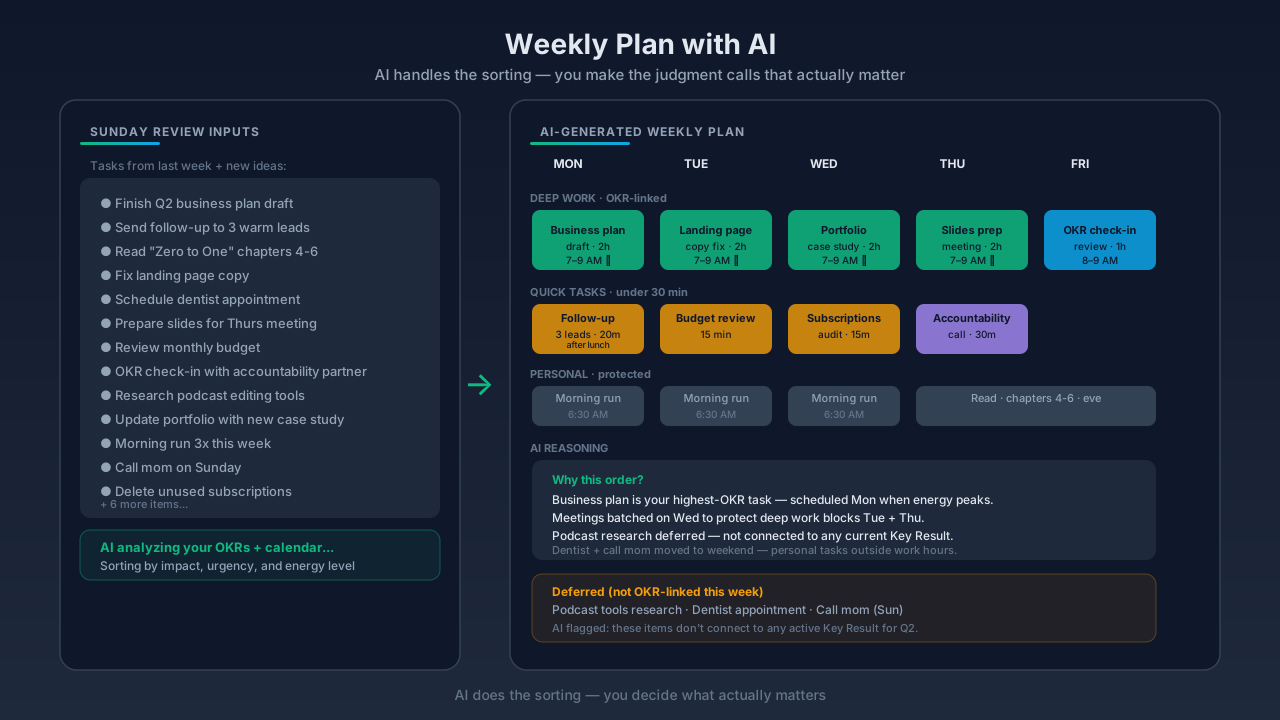
How to Use AI to Plan Your Week: The 15-Minute System That Actually Works
It's Sunday. 9:47pm. You're staring at 40 overdue tasks across three apps. You planned to plan. An hour in, you've tweaked your Notion dashboard, color-coded your calendar, and — somehow — planned almost nothing. Monday comes. You're reactive from the first hour.
This isn't a time problem. It's not a discipline problem. It's a cognitive load problem. And in 2026, AI can actually help — if you use it right.
Here's the 15-minute system. And the research on why it works.
Why Sunday Night Planning Keeps Breaking You
First, stop blaming yourself.
Having to plan our every move goes against how the unconscious brain has evolved. — Valentina Stoycheva, Psychology Today
Planning after a full work day faces the highest cognitive resistance. You've already made hundreds of small decisions. Your prefrontal cortex is cooked. And that's exactly when you sit down to sequence, prioritize, and estimate an entire week.
No wonder it feels impossible.
Supporting data from recent surveys:
- UK: people spend ~23 days per year making decisions; 58% report "decision paralysis"
- US: the average person second-guesses 41% of daily decisions; 25% feel stressed by simple choices
AI's job here isn't to replace your judgment. It's to carry the sorting, sequencing, and structuring cognitive load — so your limited decision energy goes to what actually matters.
The Data: AI Planning Actually Works (When Done Right)
The numbers from 2024–2025 are real:
- Anthropic, November 2025 (100,000 conversations): AI reduces task completion time by ~80% on suitable tasks.
- St. Louis Fed: GenAI users save ~5.4% of work hours (~2.2 hrs/week in a 40-hour week); heavy users save 4+ hours.
- BCG AI at Work 2024 (13,000+ employees): ~50% of regular GenAI users save at least 5 hours/week.
- Harvard/BCG field experiment: consultants using ChatGPT completed 12.2% more tasks, 25.1% faster, 40% higher quality.
- Stanford 2025 AI Index: 78% of organizations now use AI, up from 55% in 2023.
But here's the catch — same MIT-affiliated research that showed the 40% uplift also showed performance drops when AI is used on the wrong tasks. There's a jagged frontier between what AI is great at and what it's terrible at.
Weekly planning? It's firmly in the "great at" zone — if you give it the right inputs.
The 15-Minute AI Weekly Planning Framework
This works with ChatGPT, Claude, Gemini, or any capable LLM. You need: 15 minutes, your task list, and a rough sense of your goals.
Step 1 — Brain Dump (3 minutes)
Don't organize. That's the AI's job. You just dump.
Include:
- Every open task across apps
- Anything with a deadline
- Carried-over items from last week
- Fixed commitments
- Personal priorities (workouts, family time, meals)
Prompt template:
Here is everything I need to do this week. Help me identify the top 5 high-impact tasks, flag anything with a hard deadline, and note what can be delegated or dropped. Don't format yet — just analyze.
Paste the dump. Let it work.
Step 2 — Let AI Prioritize and Categorize (4 minutes)
Good AI applies an impact-effort matrix in seconds. It sequences by dependency. It surfaces items you underweighted.
Force four categories:
- Do this week — high-impact, must-do
- Schedule with time block — important, not urgent
- Delegate or batch — low cognitive lift, not core
- Drop or defer — no longer serves your goal
This is Eisenhower Matrix logic, but in 30 seconds instead of 20 minutes of manual wrangling.
If the output feels off — push back. "Why is X in 'drop'? I think it's more important than that." A good AI will re-argue. That's the thinking partner mode.
Step 3 — Build the Time-Blocked Schedule (5 minutes)
Now you give AI real constraints.
Prompt template:
Based on my priority list, build a time-blocked schedule for Monday–Friday. I work best between 9am–12pm for deep work. I have meetings Tuesday afternoon and Thursday morning. Leave 30 min buffer daily. Format as a simple table.
The output will not be perfect. That's fine. Reacting to a draft is way easier cognitively than building from scratch.
Edit. Approve. You now have a week.
Step 4 — Generate a Daily Kickoff Prompt (3 minutes)
This is the step everyone skips. Don't.
Ask the AI:
Create a reusable daily kickoff prompt I can paste each morning to check in against this weekly plan. It should ask me what I'm committing to today, what blocker I'm anticipating, and what I need to let go of.
That 2-minute daily check-in is the bridge between Sunday's plan and Monday–Friday reality. Without it, the plan dies by Wednesday.
What the Week Will Actually Feel Like
Anyone who's done this for a week reports almost the same arc.
Days 1–2: the honeymoon. Everything feels frictionless. Deep-work blocks are shockingly productive because there's no dithering about what to start. Decision overhead drops to almost zero.
Days 3–4: resistance and weirdness. The AI insists you take a 20-minute walk when you want to power through. Some suggestions feel practical. Others feel slightly robotic — like you're playing a character in someone else's life. You might notice a subtle loss of spontaneity.
Days 5–7: adaptation and insight. If you've been giving feedback each night, the AI starts "learning" your rhythms — scheduling lighter Fridays after intense Wednesdays. More importantly, you start seeing your own patterns. How many micro-decisions you normally juggle. Which habits actually serve you. Which ones you've been performing.
By Sunday, you haven't turned into a productivity robot. But your week becomes visible in a way it wasn't before. And that's worth more than any schedule.
The Trap: The Jagged Frontier of AI Planning
Now the honest warnings. This doesn't always work. It breaks when you:
- Paste vague task names without context ("project Y" — AI has no idea)
- Skip the brain dump and feed only the top 3 tasks
- Treat the first output as final (not pushing back)
- Use AI planning as a substitute for execution (plan, don't ship)
- Skip the mid-week review (no Wednesday check-in)
And here are the places AI should not be your planner:
- Value decisions. "Should I quit my job?" is not a weekly planning prompt. That's a life question.
- Low-clarity weeks. If you don't know your objectives, AI planning just makes the confusion faster.
- Total automation. Giving up human veto power turns the AI into an overlord. You're still CEO.
Ethan Mollick, AI researcher at Wharton, has framed the right stance well: the most successful workers in an AI era are centaurs or cyborgs — consciously deciding which parts of work they keep, and which they hand to AI. Weekly planning is a cyborg task. You + AI. Neither alone.
Which Tools Work Best
- General LLMs (ChatGPT, Claude, Gemini) — best for the thinking layer. Flexible, smart, cheap.
- Notion AI — best if your tasks already live in Notion. Contextual, seamless.
- AI Calendar tools (Motion, Reclaim) — best for enforcement. They auto-schedule, block focus time, and refuse over-scheduling. Can feel like a drill sergeant, which for some is exactly right.
- The stack — most successful setup in 2026: LLM for design + calendar tool for enforcement.
You don't need to pick one. You need to pick a role for each.
Role-Specific Adaptations
Tune the framework to your life.
Marketers: ask AI to flag tasks tied to live campaign metrics, separate content creation from distribution, surface any reporting tasks.
Freelancers / consultants: separate billable from non-billable, flag pipeline/outreach, estimate revenue proximity of each task. Prevents the classic "deliver all week, starve next month" trap.
Startup teams: a founder runs the 15-minute framework once, then posts the output as a team brief. Cuts Monday planning meetings in half. Add prompts for dependencies, blockers, and decisions-needed.
Best Practices (The 2026 Rules)
- Start with goals, not the tool. Before prompting, answer: what would make this week a win? One sentence. That becomes the north star for the whole plan.
- Give AI a brief, not blind control. Work hours, peak energy, fixed commitments, health priorities.
- Keep human veto power. If the plan doesn't feel right, override. You are still the CEO.
- Review and adjust nightly. Two minutes. What worked? What didn't? What should the AI change tomorrow?
- Protect spontaneity. Schedule unstructured time explicitly. AI will optimize every minute if you let it — and that's not a life.
- Mind your privacy. Read the tool's data policy. Know what you're feeding it.
The Bigger Shift
"I let AI plan my week" is becoming a cultural genre. TikTok. YouTube. Medium. Business Insider did an August 2025 piece on a writer letting ChatGPT run her social life for a week — the outcome was that she felt "lighter and freer" because the logistics just... vanished. (Though yes, it picked a tourist-trap restaurant once.)
The important part isn't the novelty. It's the underlying shift: offloading cognitive scaffolding to AI so human attention can go to judgment calls. That's the 2026 skill. And it compounds.
Anthropic's macro estimate is that current-gen AI could double US productivity growth, adding ~1.8% annually. Whether that lands in economy-wide numbers or not — at the individual level, the upside is there. You just have to actually use it.
Where This Fits in a Real System
Here's the caveat every AI-planning article skips. A brilliant weekly plan, executed perfectly, is still useless if it's not pointed at a quarterly objective you actually care about.
The weekly AI planning framework above is the tactical layer. For it to matter, you need a strategic layer above it — yearly vision, quarterly OKRs, monthly themes — and an execution layer below — focus blocks, daily check-ins, weekly reviews. This is exactly what systems like IdealWeek are built to give you: vision → OKR → weekly plan all in one place, so the AI-generated schedule is answering a question you've already decided matters.
Tool or no tool, the principle is the same. Weekly plans are answers. Quarterly goals are the questions. Don't plan without the question.
Do This Right Now
- Open a fresh chat with ChatGPT, Claude, or Gemini.
- Spend 3 minutes dumping everything on your plate next week. No formatting.
- Paste Prompt Template 1 (the brain-dump analyzer).
- Follow with Prompt Template 2 (the time-blocked schedule).
- Save the output. Put the time blocks on your calendar.
- Schedule a 2-minute daily kickoff for tomorrow morning.
- Schedule a 10-minute Friday review.
Fifteen minutes. Done.
Next Sunday, you'll either repeat this because it worked — or you'll be back to 9:47pm, three apps open, nothing planned, Monday already losing.
The difference between those two futures isn't IQ. It's 15 minutes, once a week, spent with an AI instead of with your own decision fatigue.
Your call. But the next hour of your life is the only time you have to choose.
Related Articles
View all →
Best AI Focus and Distraction Blocking Apps in 2026 (Tested, Ranked, Honest)
It's 3:17 PM. You were deep into a task at 2:45. You glance at your phone for "one second." Instagram. A reel. Another reel. A DM. A text. B…
Best Apps for Deep Work and Focus in 2026: Distraction Blockers, Flow State Tools, and More
You don't have a focus problem. You have an environment problem.

Focus Mode Apps With AI in 2026: How Smart Distraction Blocking Actually Works
You sit down at 9:00 to write the thing. You glance at your phone at 9:04. Three reels later, it's 9:22 and you don't remember deciding to o…

