
Time Blocking: The Complete Guide to Taking Control of Your Schedule in 2026

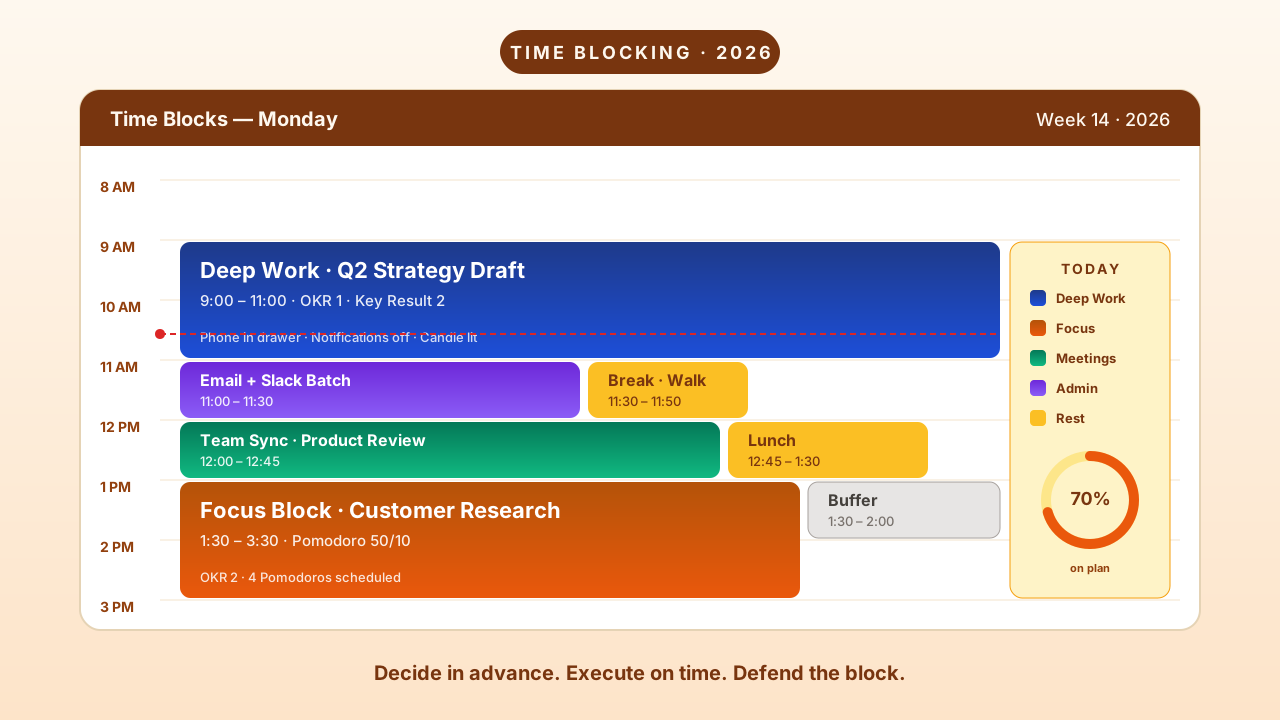
Time Blocking: The Complete Guide to Taking Control of Your Schedule
Right now, somewhere, you have a to-do list with 15+ items on it. You've been staring at it for 20 minutes trying to decide what to do first. By the time you pick something, a Slack notification pulls you away. Then an email. Then a "quick" meeting that takes 45 minutes. By 3pm, you've been "busy" all day but accomplished almost nothing that actually matters.
This is the default mode for most knowledge workers. And it's destroying their productivity.
A 2021 study in the Journal of Organizational Behavior found that employees who used time blocking reported 38% higher productivity scores and 28% lower stress levels compared to those using traditional to-do lists. Not because they worked harder. Because they stopped making thousands of micro-decisions about what to do next and started deciding in advance.
That's what time blocking is. And if you're not doing it, you're leaving your most productive hours to chance.
What Is Time Blocking (And What It's Not)
Time blocking is a productivity method where you divide your day into blocks of time, with each block dedicated to a specific task or type of work. Instead of a vague list of things to get done "today," you assign everything — deep work, meetings, email, breaks, even lunch — to a fixed slot on your calendar.
Think of it this way: a to-do list tells you what to do. Time blocking tells you what, when, and for how long.
Cal Newport, the computer science professor who wrote Deep Work, time blocks every single day. His argument: "A 40-hour time-blocked work week produces the same output as a 60+ hour work week pursued without structure."
Elon Musk takes it further — he schedules his entire day in 5-minute blocks. Not a metaphor. Actual 5-minute increments, across Tesla, SpaceX, X, Neuralink, and The Boring Company.
You don't need to be that extreme. But the principle is the same: when you decide in advance how your time will be spent, you stop reacting and start controlling.
Why Time Blocking Works: The Psychology
This isn't just a productivity hack. Time blocking exploits at least six well-documented psychological principles:
It Kills Decision Fatigue
Every decision depletes your mental energy. Psychologist Roy Baumeister's research on ego depletion showed that willpower and decision-making draw from the same limited pool. A traditional to-do list forces constant micro-decisions: What should I work on? Is this the right time? Should I do this first?
Time blocking eliminates those decisions. When 10am arrives, you don't choose. Your past self already chose. You execute.
It Weaponizes Parkinson's Law
"Work expands to fill the time available for its completion." Give yourself all day for emails, and emails will take all day. Give yourself 30 minutes, and you'll finish in 30 minutes.
Time blocking puts a hard boundary on every task. That boundary creates urgency. That urgency creates focus.
It Eliminates Attention Residue
Research by Sophie Leroy shows that when you switch tasks, your attention doesn't follow instantly. "Attention residue" from the previous task lingers for 15–25 minutes, reducing performance on the new task. Every context switch costs you.
Time blocking minimizes switches by batching similar work. Fewer switches = less residue = deeper focus.
It Defeats the Zeigarnik Effect
The Zeigarnik Effect says incomplete tasks create background psychological tension — your brain keeps them running like open browser tabs. Time blocking provides clear boundaries that give your brain permission to let go. "I'll work on this at 2pm" is enough for your mind to stop worrying about it now.
It Makes Time Concrete
Most people have some degree of "time blindness" — the inability to accurately sense how long things take. Time blocking makes time visible. When you see a 2-hour block from 9–11am, your brain grasps it. It's finite. It has boundaries. This concreteness improves both planning accuracy and engagement.
It Aligns Work with Energy
Your cognitive capacity isn't constant. It fluctuates with circadian rhythms, glucose levels, and accumulated fatigue. Time blocking lets you match demanding deep work to your peak hours (typically 9am–noon for most people) and save admin tasks for the afternoon dip.
The Four Time Blocking Methods
There's no single "right" way to time block. The best method depends on your work type, personality, and what you're struggling with.
1. Classic Time Blocking (Cal Newport Method)
Each morning (or the night before), create a detailed schedule for your entire day. Assign every block to a specific task — not "work on project" but "draft introduction section for Q2 report."
Best for: Knowledge workers who need focused deep work sessions alongside meetings and admin.
2. The Pomodoro Technique
Work in focused 25-minute intervals separated by 5-minute breaks. After four rounds, take a 15–30 minute break. The timer creates artificial urgency that crushes procrastination.
Best for: Tasks that feel overwhelming or tedious. Great for getting started when motivation is low.
3. Task Batching
Group similar tasks into one block. All emails in a 30-minute slot. All phone calls back-to-back. All creative work in one uninterrupted session. This minimizes context switching — the biggest silent productivity killer.
Best for: People with many small, varied tasks throughout the day.
4. Day Theming
Dedicate entire days to specific types of work. Monday = client work. Tuesday = creative projects. Wednesday = meetings and collaboration. This is extreme batching — and it works incredibly well for people managing multiple roles.
Best for: Entrepreneurs, founders, and anyone wearing multiple hats.
Mix and match. Use Pomodoro within a time block. Batch tasks on themed days. The methods are complementary, not competing.
How to Start Time Blocking (5 Steps)
Step 1: Audit Your Current Time
Before optimizing, understand where time currently goes. For one week:
- Track all activities (work, meetings, breaks, scrolling)
- Note when you feel most energetic and when you hit walls
- Identify time sinks and interruption patterns
Most people discover they're productive for roughly 2.5 hours in an 8-hour day. The rest is meetings, email, and unconscious distraction.
Step 2: Identify Your Top 3 Priorities
Not 10. Not 7. Three. What are the three things that, if you accomplished them this week, would make the biggest difference? These get protected time blocks first. Everything else fits around them.
Step 3: Build Your Ideal Week Template
Start with fixed commitments (recurring meetings, deadlines). Then:
- Schedule deep work blocks during your peak energy hours
- Batch communication (email, Slack) into 2–3 dedicated slots
- Add buffer blocks (15–30 min) between major activities
- Build in breaks, exercise, and meals as non-negotiable blocks
- Leave 20% of your day unscheduled for the unexpected
Step 4: Plan Each Day the Night Before
Spend 10–15 minutes each evening adapting tomorrow's schedule:
- Review the ideal week template
- Adjust for specific deadlines and meetings
- Identify your "frog" — the hardest task — and schedule it first
- Use verbs, not nouns: "Draft intro for Q2 report" not "Q2 report"
Step 5: Review and Iterate Weekly
Set a recurring 15-minute weekly review:
- What worked? What didn't?
- Were your time estimates accurate?
- Which blocks consistently ran over?
- What do you need to adjust for next week?
Expect imperfection. Even 60–70% adherence to your time blocks is a dramatic improvement over no structure at all.
Best Time Blocking Apps in 2026
The right time blocking app makes the difference between a system you maintain and one you abandon after a week. Here's what actually works:
IdealWeek — Best for Goal-Connected Time Blocking
Most time blocking apps help you organize your day. IdealWeek connects your day to your life goals.
The Execution Planner is a timeline-based daily planner where every activity has exact start and end times — and ties directly to your OKRs. So a "Deep work: Q2 product strategy" block doesn't just occupy your calendar. It logs focused hours against the specific key result it supports.
What stands out:
- Timeline-based scheduling with start/end times tied to OKRs
- "Select to start" / Pause / Stop flow for each activity — clear psychological boundaries
- Recurring schedule support for consistent weekly routines
- Burning candle focus mode auto-triggers when you start an activity
- 7-day insights dashboard showing time allocation across OKR, ad-hoc, and routine work
- Behind-the-plan alerts when progress falls behind time elapsed
Best for: People who want time blocking connected to measurable goals, not just calendar organization.
Google Calendar — Best Free Time Blocking Tool
Google Calendar isn't technically a "time blocking app," but it's what most people use — and it works fine for basic blocking. Create color-coded events for different work types, set reminders, share with teams.
Limitation: No task management, no progress tracking, no connection to goals. It shows you what you planned. It can't tell you if the plan worked.
Motion — Best for AI-Automated Time Blocking
Motion auto-schedules your tasks into your calendar based on deadlines, priority, and available time. New meeting gets added? Motion rearranges your blocks automatically.
Best for: People whose calendars are chaotic and need AI to defend their focus blocks.
Limitation: Expensive ($19/mo). The AI needs a full calendar to optimize against — works less well for unstructured days.
Sunsama — Best for Daily Ritual Time Blocking
Sunsama guides you through a daily planning ritual: pull tasks from various sources, time-box each one, drag them onto your calendar. It's the most deliberate planning experience of any app.
Best for: People who value a structured daily planning process and use multiple tools (Asana, Trello, Jira, etc.).
Akiflow — Best for Power Users
Akiflow combines task management with calendar blocking in one keyboard-first interface. Universal inbox captures tasks from anywhere, then you drag them into time blocks.
Best for: Keyboard-driven productivity nerds who want speed over guidance.
When Time Blocking Feels Wrong (And How to Fix It)
"It kills creativity." No — it protects it. Without time blocking, creative work gets perpetually postponed for "urgent" tasks. Block creative time and defend it.
"It's too rigid." You're over-scheduling. Leave 20% unscheduled. When disruptions happen, Cal Newport's advice: draw a line through the rest of the day and re-block the remaining hours. The plan isn't sacred. The practice of planning is.
"It creates anxiety." You're blocking more work than is humanly possible. Limit deep work blocks to 4–5 hours max per day. Block rest and transitions too.
"I can't predict how long things take." That's exactly why you need it. Track your actuals. Double your estimates for new tasks. After two weeks of data, your estimates will be dramatically better.
Your First Time-Blocked Day
Stop overthinking. Here's your plan for tomorrow:
- Tonight, open your calendar
- Block 90 minutes in the morning for your most important task — your "frog"
- Block 30 minutes for email/Slack (not before your deep work block)
- Block 60 minutes for your second priority
- Leave the afternoon loosely scheduled with buffer blocks
- Block your lunch. Actually take it.
That's it. One day. Six blocks. If it works — and it will — repeat it the next day with adjustments.
The most productive people on the planet don't have more hours than you. They just decide in advance how to spend the ones they have.
Decide now. Block tomorrow. Execute.
Related Articles
View all →
Time Management Strategies That Actually Work in 2026
Here's an uncomfortable truth: you probably waste 3–4 hours every workday. Not on purpose. Not because you're lazy. But because nobody taugh…

Best AI Focus and Distraction Blocking Apps in 2026 (Tested, Ranked, Honest)
It's 3:17 PM. You were deep into a task at 2:45. You glance at your phone for "one second." Instagram. A reel. Another reel. A DM. A text. B…
Best Apps for Deep Work and Focus in 2026: Distraction Blockers, Flow State Tools, and More
You don't have a focus problem. You have an environment problem.

