

AI Productivity Tools That Actually Save Time in 2026 (Not Just Promise To)

AI Productivity Tools That Actually Save Time in 2026 (Not Just Promise To)
You installed ChatGPT. Then Notion AI. Then Perplexity. Then three Chrome extensions your LinkedIn feed swore would change your life. It's April. Your to-do list is somehow longer than it was in January. What happened?
Here's the uncomfortable number.
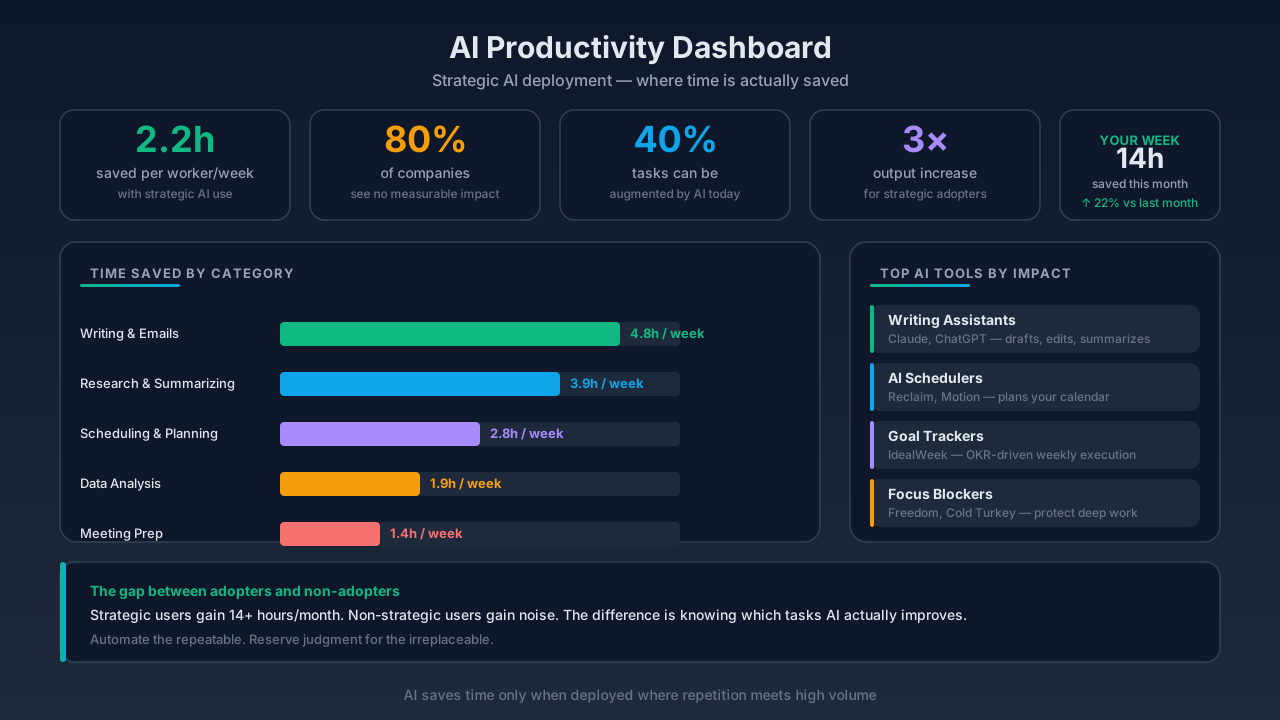
Workers using generative AI save an average of 5.4% of work hours weekly — about 2.2 hours for a 40-hour week. — Federal Reserve research, via AutoFaceless
One full workday reclaimed every month. That's real. That's measurable. And most people aren't getting it.
The difference between people pulling 2.2 hours back every week and people just adding more tabs? Not budget. Not IQ. Strategy.
Let's fix yours.
The 2026 Productivity Paradox Nobody Is Talking About
First, the reality check. AI adoption in 2026 is basically universal.
91% of businesses use AI in 2026, yet over 80% of firms report no measurable impact on productivity. — AutoFaceless
Read that twice. Nine out of ten companies are using AI. Eight out of ten see nothing from it. The productivity paradox isn't subtle.
What's going on?
Surface-level deployment. People bolt on a chatbot, get excited, never restructure how work actually happens. AI becomes another tab instead of a workflow shift.
The ones who do restructure? Different story entirely:
Industries meaningfully embracing AI see labor productivity grow 4.8x faster than the global average. — AutoFaceless
Almost five times faster. That's not a rounding error. That's the entire game.
The Power User Effect: 9+ Hours Back Per Week
Here's where it gets interesting.
27% of AI users save over 9 hours per week; some power users reclaim 20+ hours. — AutoFaceless
Twenty hours. Half a workweek.
That's not because power users have a secret AI nobody else knows about. They have the same tools you do. They just use them on the right jobs.
Because this is the part nobody tells you:
AI triples productivity on approximately one-third of tasks. — AutoFaceless
It's not uniform. AI doesn't make every task faster. It makes a specific third of your work dramatically faster — and barely helps with the rest. Knowing the difference is the entire skill.
The One-Third That Actually Saves You Time
Where AI delivers outsized gains:
- Drafting — first passes on emails, briefs, outlines, proposals
- Research — synthesizing long articles, summarizing threads, comparing options
- Data analysis — pulling patterns out of spreadsheets and logs
- Coding — boilerplate, refactoring, explanation of unfamiliar code
- Content creation — headlines, structures, variations, edits
40% typical efficiency lift for AI-assisted knowledge work; 25% reported quality improvement. — productivity.design
A 40% efficiency lift with a 25% quality bump. That's the honey zone. Stay in it.
Everything else? Don't force AI into it. You're just adding prompts to work that didn't need them.
Role-Specific Wins: Sales Is the Poster Child
If you want a clean example of what happens when AI meets the right job:
Sales professionals using AI save 12 hours per week (47% more productive). — AutoFaceless
Why sales? Because sales has a massive "one-third" zone. Prospect research. Email drafting. CRM updates. Follow-up sequences. Call summaries. All the stuff that used to eat afternoons.
Apply that lens to your own role. What's your one-third? If you're honest, you can probably name three tasks right now that burn two hours a day and could be compressed into twenty minutes with the right AI workflow.
Those are your targets. Start there. Ignore the rest.
The Stack: Start With Two or Three Tools, Not Thirty
Here's where most people self-sabotage. They hear about a cool tool, install it, never learn it deeply, move to the next one. Three months later: five tools, mastery of none.
The research-backed advice is refreshingly boring:
For most students and professionals, two or three tools cover the essentials. Add further tools only when a specific, recurring problem arises. — AI Arena
Zero-Cost Starter Stack
If you're starting fresh in 2026 and don't want to pay anything yet:
Zero Cost Start: ChatGPT + Grammarly + Perplexity AI covers most everyday needs. — AI Arena
That's it. That's the stack.
- ChatGPT (free tier, GPT-4o-class) — drafts, explanations, brainstorming, outlines, coding help
- Grammarly — editing pass on anything you write
- Perplexity AI — research with actual citations
ChatGPT: Best All-Round AI Productivity Assistant. Best for: essay outlines, concept explanations, revision quizzes, email drafting, general academic assistance. — AI Arena
Use those three for a month before you add anything else. You'll find out fast which tool you're actually missing — if any. Most people stop adding after this.
The Real Move: Redesign, Don't Decorate
Here's the trap. You install the tools. You use them in the same workflow. Nothing changes. Because you haven't changed what you're doing, only how.
The 4.8x number only shows up when people redesign.
What redesign looks like:
- Cut meetings that AI summaries can replace
- Replace a 2-hour research task with a 20-minute Perplexity + read flow
- Delete the weekly "write an update" ritual; generate a draft, edit, ship
- Stop doing the "I'll read this 40-page PDF" bit; summarize, flag what matters, read only that
You're not using AI to do the same work faster. You're using it to delete work entirely.
But Saved Time Only Matters If You Actually Use It
This is the part every productivity article skips. Saving 2.2 hours a week is meaningless if those hours get absorbed into doom scrolling, more Slack, or "just one more" meeting.
Reclaimed time doesn't automatically go to what matters. It goes where your structure points it. No structure? Back to the feed.
The fix is simple but uncomfortable: decide where reclaimed time goes before you reclaim it.
Name it. Something like:
- "Every Friday 2–4pm, deep work on my side project."
- "Every Monday morning, 30 minutes reviewing weekly goals."
- "Every evening, 20 minutes away from screens."
Then when AI hands you back that hour? Put it there. Defend it.
So What Are You Going to Do About It?
Open your calendar. Right now. Look at last week.
- Circle the three tasks that ate the most hours.
- Of those three, which one falls into the "one-third zone" — drafting, research, data, coding, content?
- That task is where AI gets you a 2–3x speedup. Not "you should use AI more." That specific task.
- Pick one of the three zero-cost tools and use it for that job only for the next two weeks.
- Define the slot where your reclaimed hour goes before the two weeks are up. Write it down.
Two weeks from now, you'll have proof. Either the saved time showed up and went where you aimed it — or it didn't, and you'll know exactly why.
Because the 2.2 hours are out there. The 9+ hours are out there. 20 if you're serious. The question isn't whether AI productivity tools work in 2026.
It's whether you're going to use them on the right third — or keep collecting tabs.
Related Articles
View all →
AI Habit Tracking in 2026: Why Behavior Agents Are Replacing Habit Apps
You downloaded the app on a Sunday night. Full of ambition. Meditate, read, run, no phone after 9pm. The first week felt amazing — green che…

AI Life Coach Apps: Do They Actually Work? What the 2026 Research Really Says
You open the app. It asks how your week went. You dump your thoughts. It reflects them back in tidy bullet points, suggests a SMART goal, se…

AI vs Human Accountability: What Actually Works Better for Goals in 2026
You told your AI assistant your goals last month. It remembered them. Good.

